Poolhall Recruitment: a WordPress website case study
In short
For Poolhall Recruitment, we built a WordPress website with distinct routes for candidates and employers, searchable vacancies, individual job pages and online CV registration. A custom integration plugin handles the recruitment-specific work separately from the website’s presentation. This case study shows the public journeys and explains how the project was structured.
Need help with this? WordPress websites for recruitment agencies
The agency and the website brief
Poolhall Recruitment works across construction, manufacturing, and digital and office recruitment. Its website needs to introduce those specialisms while helping people take the next step: find work, register for future opportunities or discuss hiring.
We built the WordPress site around those journeys. The project combines agency and sector content, a jobs area, candidate forms and a custom recruitment integration.

Give candidates and employers their own starting points
The homepage offers separate Find work and Hire talent routes. Candidates can move into vacancies or registration; employers can explore the agency’s services and make an enquiry. Sector pages provide context before either audience gets in touch.
This structure keeps the website brief grounded in the decisions people are trying to make. A candidate looking for a role needs different information from an employer comparing recruitment support.
Build job search around useful vacancy information
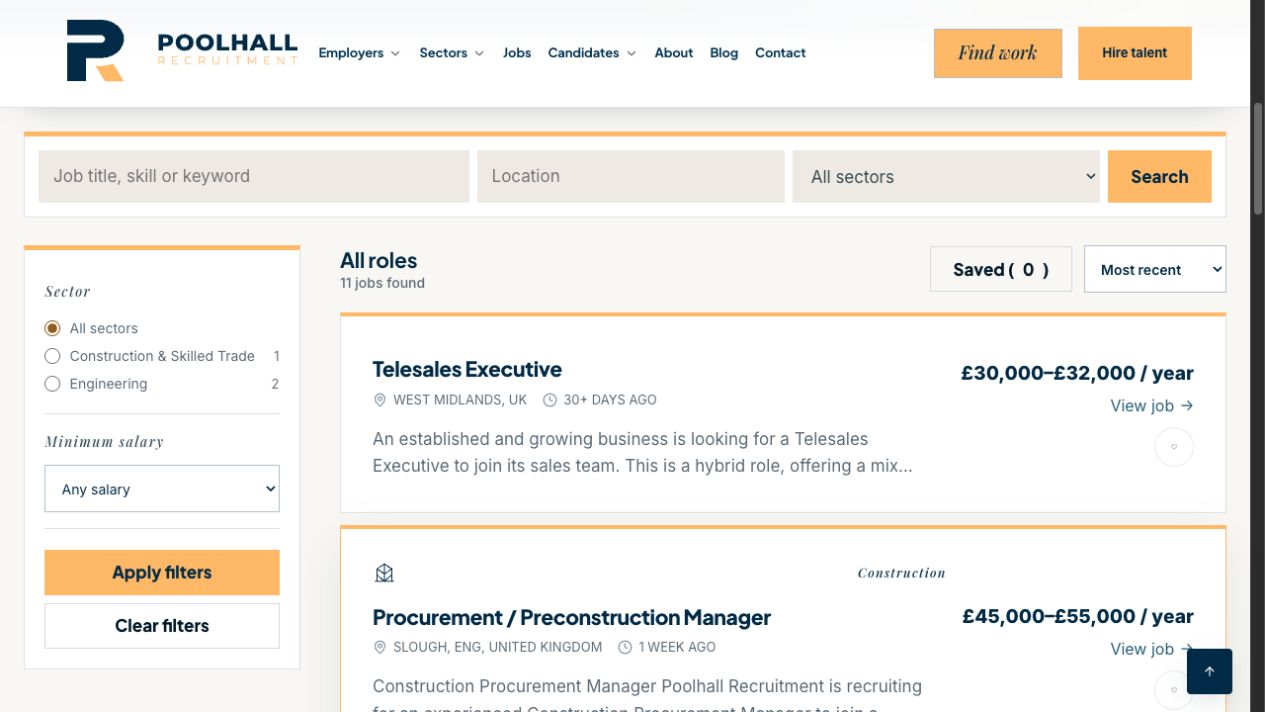
The jobs area brings keyword, location and sector search together with salary filtering and sorting. Vacancy cards show role information and link to individual job pages, giving candidates somewhere to read the details before applying.
The custom WordPress plugin includes the Giig vacancy adapter, synchronisation and expiry handling, together with job-page structured data. Keeping those operations in a plugin separates the vacancy workflow from the theme used to present it.
Provide a separate route for general CV registration
A candidate may want to introduce themselves without applying for a particular vacancy. Poolhall’s Register your CV page provides that route, with contact details, location, the kind of role sought and a CV upload. Optional questions allow candidates to add useful context.
General registration and a vacancy application serve different purposes. Treating them as separate journeys helps define the questions, the recruiter’s next step and which vacancy context needs to travel with an application.
Structure the implementation around the agency’s workflow
The build uses WordPress, an Elementor child theme and a custom integration plugin. The child theme handles presentation; the plugin contains the recruitment data and workflow logic. The project also includes candidate-account and invited-paperwork workflows with recruiter review and correction steps.
Each connection needs its own field map and account permissions. Vacancy publishing, public registration and accepted-profile updates are separate operations. An implementation for one does not establish that every field or document can be transferred by another. Recruitment Connected is not affiliated with or endorsed by Giig.
What to take into your own website brief
Poolhall is an example of a recruitment website and workflow build. For your agency, start with the journeys your team needs and the systems you already use.
- Give candidates and employers clear routes from the homepage.
- Agree how vacancies are published, updated and closed.
- Distinguish a general registration from an application for a named role.
- Decide who reviews information and how missing answers are corrected.
- Check each system operation and its permissions before agreeing the integration scope.
Bring your current website and the step you want to improve to an initial discussion. We can work through whether you need a new WordPress site, a focused integration or a forms project.